

Clean, consistent posters for your whole media library.

Studio posters come in every font, tagline and layout. Posteryard swaps them for textless art with the title in the same spot on every poster, then renders, uploads and refreshes them on its own in Plex or Jellyfin as your library grows.

What Posteryard changes

BeforeDeadpool & Wolverine, official poster
PosteryardDeadpool & Wolverine, rendered by Posteryard

Clean art.

Textless art from TMDB, Apple TV or fanart.tv, with the title logo in one spot at one size.

TMDB_API_KEYAPPLE_ART=trueFANART_API_KEY

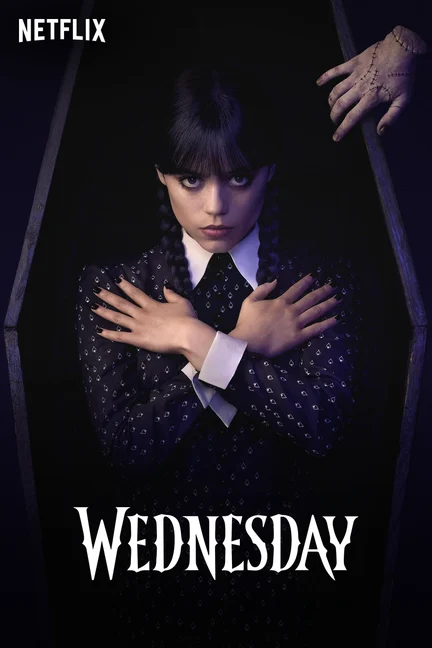
BeforeWednesday, official poster
PosteryardWednesday, rendered by Posteryard

Where it streams.

The mark of the service a show streams on, looked up on TMDB for the countries you list.

STREAMING_REGIONS
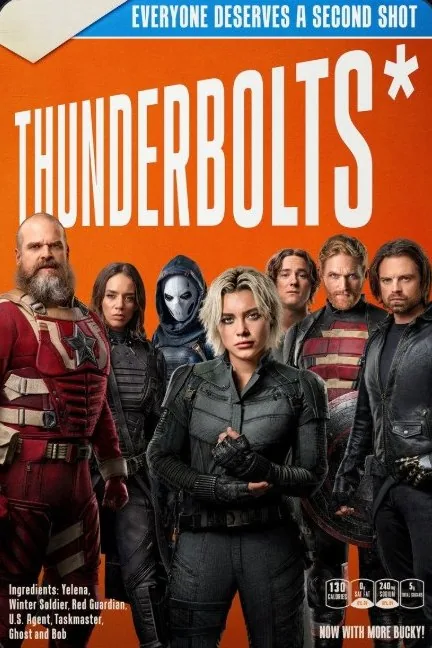

BeforeThunderbolts*, official poster
PosteryardThunderbolts*, rendered by Posteryard

Quality badges.

Resolution, HDR and audio badges from each file, starting at the level you set.

QUALITY_MIN_VIDEOQUALITY_MIN_HDRQUALITY_MIN_AUDIO


BeforeLilo & Stitch, official poster
PosteryardLilo & Stitch, rendered by Posteryard

Status labels.

Just added, New episode, New season, or New season Oct 21 before a premiere. With Maintainerr, a red label counts down to its delete date: Leaving in 5 days, then tomorrow, then today.

STATUS_LABELSMAINTAINERR_URL
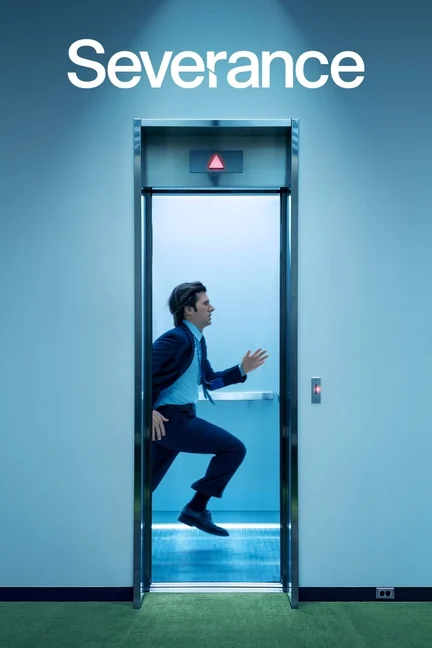
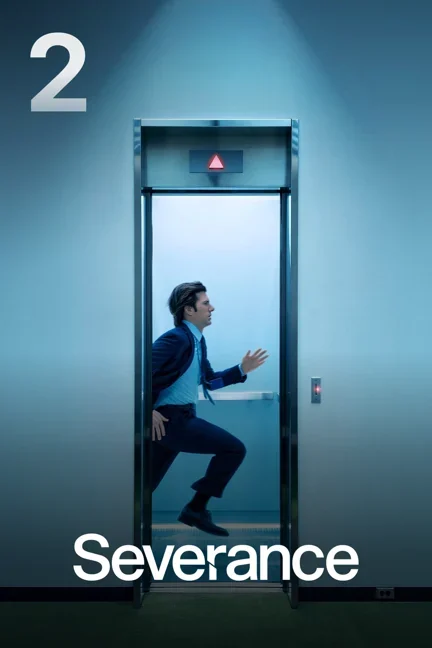
BeforeSeverance Season 2, official poster
PosteryardSeverance Season 2, rendered by Posteryard

Seasons, collections, episodes.

Season numbers, channel tiles for service collections, and episode thumbnails with their title.

SERVICE_COLLECTIONSCOLLECTION_POSTERSEPISODE_THUMBNAILS

Get started

You need Docker on an x86-64 or ARM64 host, a free TMDB API key and your Plex token. For Jellyfin, see Jellyfin.

  1. Create the compose file

    compose.yml
    services:
      posteryard:
        image: ghcr.io/sandobserver/posteryard:latest
        container_name: posteryard
        restart: unless-stopped
        init: true
        read_only: true
        tmpfs:
          - /tmp
        cap_drop:
          - ALL
        security_opt:
          - no-new-privileges:true
        environment:
          # TMDB API Key or API Read Access Token
          - TMDB_API_KEY=your-tmdb-api-key
          # Plex's network address. Not localhost.
          - PLEX_URL=http://192.168.1.10:32400
          - PLEX_TOKEN=your-plex-token
          # Any long random text: openssl rand -hex 16
          - WEBHOOK_SECRET=any-long-random-text
          # The daily pass runs at DAILY_AT in this time zone
          - TZ=America/New_York
          - DRY_RUN=true
        volumes:
          - ./data:/data
        ports:
          - "8000:8000"

    Plex in Docker on the same network? Use its container name, such as http://plex:32400.

  2. Start it

    Terminal
    mkdir -p data && sudo chown 1000:1000 data
    docker compose up -d

    Posteryard runs as user 1000 and writes only to ./data and /tmp.

  3. Preview, then go live

    With DRY_RUN=true, Plex is not touched: images go to ./data/previews, such as 5646-poster.jpg. docker logs -f posteryard shows progress through the first full run.

    When you like them, set DRY_RUN=false and run docker compose up -d again. Images are uploaded and locked, so a Plex refresh keeps them. ONLY_RATING_KEYS limits a first run to a few titles.

    After that:

    • With Plex Pass, add http://SERVER-IP:8000/webhook/YOUR-WEBHOOK-SECRET under Settings > Webhooks so new titles get posters right away. Without it, they follow within 15 minutes.
    • Turn off poster overlays in other tools, such as Kometa, or the two overwrite each other.

Settings

26 optional settings for badges, status labels, collections, Jellyfin, Maintainerr, alerts and the schedule. Commands, Plex labels and monitoring are in the full documentation.

Use Jellyfin instead of Plex

Replace PLEX_URL and PLEX_TOKEN with these two lines.

environment
- JELLYFIN_URL=http://192.168.1.10:8096
- JELLYFIN_API_KEY=your-jellyfin-api-key

Get alerts in Discord

Use the two parts of your Discord webhook URL. Any Apprise address works, such as ntfys:// or mailtos://.

environment
- NOTIFY_URLS=discord://WEBHOOK_ID/WEBHOOK_TOKEN

Count down to Maintainerr deletions

Titles Maintainerr will delete get LEAVING IN 5 DAYS, then TOMORROW, then TODAY.

environment
- MAINTAINERR_URL=http://192.168.1.10:6246

Streaming services outside the US

The default is US. Put your country first and keep US as a fallback. This example is the UK.

environment
- STREAMING_REGIONS=GB,US

Badges for 1080p and 5.1 too

By default only 4K, HDR10 or better, and Dolby Atmos get a badge.

environment
- QUALITY_MIN_VIDEO=1080
- QUALITY_MIN_AUDIO=5.1

Use Apple TV art where it exists

Titles Apple TV does not have keep TMDB art.

environment
- APPLE_ART=true

Go live on two titles first

posteryard find NAME lists rating keys. Remove ONLY_RATING_KEYS when you are happy.

environment
- DRY_RUN=false
- ONLY_RATING_KEYS=5646,8730

Show the episode title on thumbnails

Adds EPISODE N and the title to each episode still.

environment
- EPISODE_THUMBNAILS=titled
Show all 26 settingsHide settings

Start

DRY_RUNPreview only, or upload.true

true renders every image into /data/previews and changes nothing on your server. false uploads the images and locks them, so a metadata refresh keeps them.

LIBRARIESThe libraries to manage.Movies,TV Shows

Names exactly as your server shows them, separated by commas. Movie and TV libraries only. PLEX_LIBRARIES works too.

ONLY_RATING_KEYSLimit Posteryard to a few titles.

Rating keys separated by commas; posteryard find NAME lists them. A show includes its seasons and episodes. Empty means every title.

JELLYFIN_URL, JELLYFIN_API_KEYUse Jellyfin instead of Plex.

Set both and leave out PLEX_URL and PLEX_TOKEN. See Jellyfin.

Art

APPLE_ARTUse Apple TV's key art when it exists.false

true uses the art from a title's Apple TV page as poster art, found through its Apple TV id on Wikidata, in the store of your first STREAMING_REGIONS country. Titles Apple TV does not have keep TMDB art. art next, art set and the labels still override it. Apple can change its pages without notice.

FANART_API_KEYA second source when TMDB has no clean art.

Your personal API key from your fanart.tv profile. When TMDB has no usable art, title logo or backdrop for a title, Posteryard tries fanart.tv's, with the same check for printed text.

LOGO_LANGUAGESTitle logo languages, in order.en

Two-letter codes separated by commas, such as fr,en. Posteryard uses the first language TMDB has a logo in.

PREFER_WORDMARKPrefer the title written out over an emblem.true

When TMDB has both a wide logo with the name and a square emblem, true picks the wide one.

Badges

QUALITY_MIN_VIDEOLowest resolution that gets a badge.2160

off, 720, 1080 or 2160. With 2160, only 4K files get a resolution badge.

QUALITY_MIN_HDRLowest HDR format that gets a badge.hdr10

off, hdr10, hdr10plus or dolbyvision. With dolbyvision, only Dolby Vision files get an HDR badge.

QUALITY_MIN_AUDIOLowest audio that gets a badge.atmos

off, 5.1, 7.1 or atmos. DTS:X counts as atmos.

QUALITY_ACCESSIBILITYSubtitle and audio description badges on movies.

Any of sdh, cc and ad, separated by commas, on their own line. Read from the track flags, or from track names such as "English (SDH)". Empty means none.

Labels and marks

STATUS_LABELSLabels for new titles, episodes and seasons.true

A coloured label above the title: JUST ADDED for 14 days after a title arrives, NEW EPISODE or NEW SEASON for 7 days after one arrives, and NEW SEASON OCT 21 from 30 days before a premiere. false turns these off; the Maintainerr label stays.

MAINTAINERR_URLCount down to Maintainerr deletions.

Your Maintainerr address. A title in a Maintainerr collection that deletes after a number of days gets a red label counting down to that day: LEAVING IN 5 DAYS, then LEAVING TOMORROW, then LEAVING TODAY.

STREAMING_REGIONSCountries to find a show's streaming service in.US

Two-letter country codes, in order. Posteryard uses the first country where TMDB lists a streaming service for the show. Outside the US, put your country first and keep US as a fallback, such as GB,US.

Seasons and collections

EPISODE_THUMBNAILSHow episode thumbnails look.plain

plain keeps the still with a light shade at the bottom. titled adds EPISODE N and the episode title. off leaves episodes alone and restores your server's own thumbnails.

COLLECTION_POSTERSPosters for collections too.false

true gives every collection a poster. A collection named after a streaming service, such as Netflix, gets Apple TV's channel tile: its newest show's art over a band with the service mark. Other collections get the regular tile with their name set in white.

SERVICE_COLLECTIONSOne collection per streaming service.false

true keeps a collection for each service with at least 3 shows in each TV library. Posteryard only changes collections it made; they carry the posteryard-collection label. Nothing changes while DRY_RUN is on. Leave it off if another tool already makes these, and use COLLECTION_POSTERS.

Alerts and schedule

NOTIFY_URLSWhere alerts go.

Apprise addresses separated by spaces or commas: Discord, Telegram, Gotify, Pushover, Slack, email, ntfy and about 100 more. See Alerts.

HEARTBEAT_URLAn address to call while healthy.

Posteryard calls it every minute while it works, such as an Uptime Kuma push URL. When the calls stop, your monitor alerts you. See Monitoring.

SWEEP_MINUTESMinutes between checks for new titles.15

Each check handles titles added or changed since the last one, titles Maintainerr lists, and failed titles due for a retry.

DAILY_ATTime of the daily full pass.04:15

A pass over every title, as HH:MM in your TZ.

Advanced

LOG_LEVELHow much the log shows.info

debug, info, warning or error.

LISTEN_PORTPort inside the container.8000

If you change it, change the right side of ports: to match.

DATA_DIRFolder for the database, previews and custom art./data

Inside the container. Keep the default and mount a volume there.

..._FILERead a secret from a file.

Add _FILE to a secret's name and give a path, such as a Docker secret: PLEX_TOKEN_FILE=/run/secrets/plex_token. Works for TMDB_API_KEY, FANART_API_KEY, PLEX_TOKEN, JELLYFIN_API_KEY, WEBHOOK_SECRET, NOTIFY_URLS and HEARTBEAT_URL.